เหมาะสำหรับ
- เริ่มจากพรอมต์ที่มีโครงสร้างและใช้ซ้ำได้ แทนที่จะเป็นแชทเปล่า
- ปรับพรอมต์ให้เข้ากับข้อมูลของคุณ โดยยังคงเจตนาเดิมไว้
- เวิร์กโฟลว์ที่เกี่ยวข้องกับ Design & Art

เปลี่ยนภาพที่อัปโหลดให้เป็นสไตล์เฉพาะของช่างภาพชื่อดัง
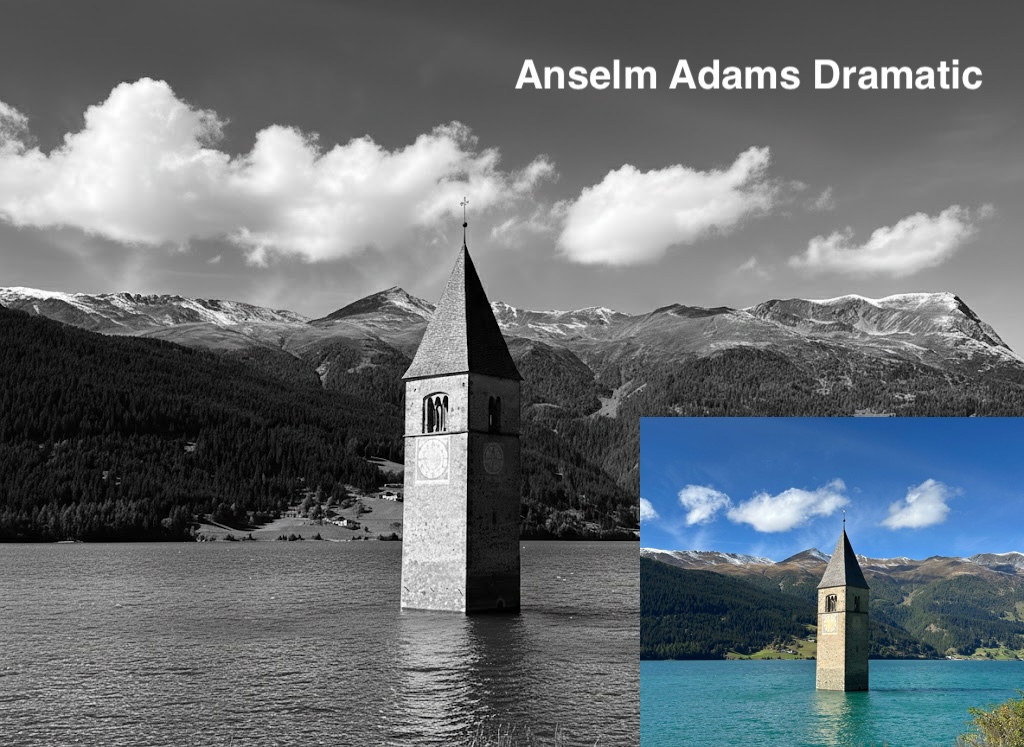
I have attached an image. Please follow these steps:

Step 1: Create a detailed description of the artistic style of {{Photographer:[photographers]}}, focusing on their lighting, composition, subject matter, and mood.

Step 2: Take the attached image and use the description from Step 1 to modify it.
[photographers]
I have attached an image. Please follow these steps:

Step 1: Create a detailed description of the artistic style of [photographers], focusing on their lighting, composition, subject matter, and mood.

Step 2: Take the attached image and use the description from Step 1 to modify it.
ตัวแปรจะอยู่ภายใน {{ และ }} และเป็นไปตามรูปแบบนี้:
ตัวเลือกสามารถอ้างอิงรายการตัวแปรที่กำหนดไว้ล่วงหน้าโดยใช้วงเล็บเหลี่ยม ตัวเลือกเหล่านี้จะแสดงเป็น[สีส้ม]และให้ค่าที่ใช้บ่อย เช่น สี โทน หรือภาษา
คุณยังสามารถระบุรายการตัวเลือกแบบอินไลน์ โดยคั่นด้วยเครื่องหมายจุลภาคได้
เคล็ดลับ: คุณไม่จำเป็นต้องใช้แอป PUCO เพื่อใช้พรอมต์เหล่านี้! เพียงคัดลอกเทมเพลตและแทนที่แต่ละส่วน {{…}} ด้วยข้อความของคุณเองโดยตรงใน ChatGPT, Claude, Gemini หรือผู้ช่วย AI อื่น ๆ