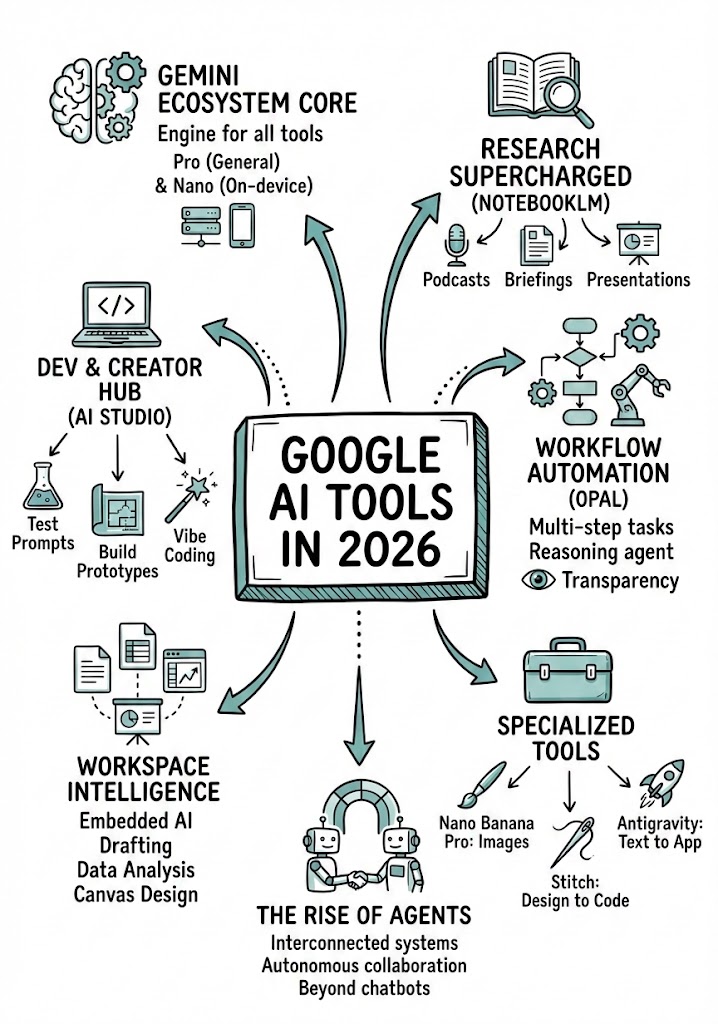
Analyze the YouTube video regarding {{Topic: Take from the video context}} located at: {{YouTube URL: https://youtu.be/...}}.

First, summarize the content into small, digestible concepts to learn easily.

Once analyzed, create a hand-drawn sketchnote visual summary of these notes using the following specifications:
- Background: Pristine white paper (no lines).
- Art Style: 'Graphic recording' or 'visual thinking' using black ink fine-liners for clear outlines and text.
- Colors: {{Accent Colors:Teal, Orange, Muted Red, Emerald Green, Navy Blue, Mustard Yellow, Charcoal Grey, Royal Purple}} for simple shading and accents.
- Composition: Center the main title in a 3D-style rectangular box. Surround the title with radially distributed simple doodles, business icons, stick figures, and graphs that explain the concepts. Use arrows to connect ideas.
- Text: Distinct, handwritten, all-caps printing, legible and organized like a professional brainstorming session.
- Orientation: A4 Vertical layout.
Guia do prompt
Ideal para
Começar a partir de um prompt estruturado e reutilizável em vez de um chat em branco.
Adaptar o prompt aos seus próprios dados, mantendo intacta a intenção original.
Fluxos de trabalho relacionados com Education & Academic, Creative & Visuals, Design & Art.
Como usar
Copie o modelo de prompt completo.
Substitua cada variável pelo seu próprio contexto ou escolha uma das opções sugeridas.
Cole o prompt concluído no ChatGPT, Claude, Gemini ou outro assistente de IA.
Variáveis neste prompt
Topic
Take from the video context
YouTube URL
https://youtu.be/...
Accent Colors
Teal, Orange, Muted Red, Emerald Green, Navy Blue, Mustard Yellow, Charcoal Grey, Royal Purple
Exemplo de ponto de partida
Analyze the YouTube video regarding Take from the video context located at: https://youtu.be/....

First, summarize the content into small, digestible concepts to learn easily.

Once analyzed, create a hand-drawn sketchnote visual summary of these notes using the following specifications:
- Background: Pristine white paper (no lines).
- Art Style: 'Graphic recording' or 'visual thinking' using black ink fine-liners for clear outlines and text.
- Colors: Teal for simple shading and accents.
- Composition: Center the main title in a 3D-style rectangular box. Surround the title with radially distributed simple doodles, business icons, stick figures, and graphs that explain the concepts. Use arrows to connect ideas.
- Text: Distinct, handwritten, all-caps printing, legible and organized like a professional brainstorming session.
- Orientation: A4 Vertical layout.
Como funcionam as variáveis
Sintaxe das variáveis
As variáveis ficam entre {{ e }} e seguem este padrão:
{{variable name: option1, option2, option3}}
Variáveis predefinidas
Uma seleção pode fazer referência a uma lista de variáveis predefinida usando colchetes. Aparecem em [laranja] e fornecem valores comuns, como cores, tons ou idiomas.
{{Tone: [tones]}}
Listas de seleção personalizadas
Também pode fornecer uma lista de opções em linha, separadas por vírgulas.
Dica: não precisa da app PUCO para usar estes prompts! Basta copiar o modelo e substituir cada secção {{…}} pelo seu próprio texto diretamente no ChatGPT, Claude, Gemini ou qualquer outro assistente de IA.
Prompts relacionados
Hyper Realistic Winter Portrait
Generates an extreme close-up portrait of a young woman in a snowy outdoor winter scene with macro focus on eyes.
Transforms a subject into a colossal, intricately detailed stained-glass window panel set within a massive Gothic cathedral, emphasizing physical realism and bioluminescent pigments[cite: 1].